
Customers
Customer Preview
This section provides detailed guidance on viewing and managing individual customer information within the Integrated Insurance Management System. Learn about navigating the customer preview interface, understanding the displayed customer details, and performing various customer-related actions.
Customer Preview Interface
The customer preview interface provides a comprehensive view of an individual customer's profile in the insurance system. This interface allows staff to review customer details, update information, and initiate various customer-related processes.
Accessing the Customer Preview
- Log into the Integrated Insurance Management System
- Select "Customers" from the Operations menu in the sidebar then "All customers"
- From the "All Customers" list, click on a specific customer's name
- The system will display the customer preview page with detailed information
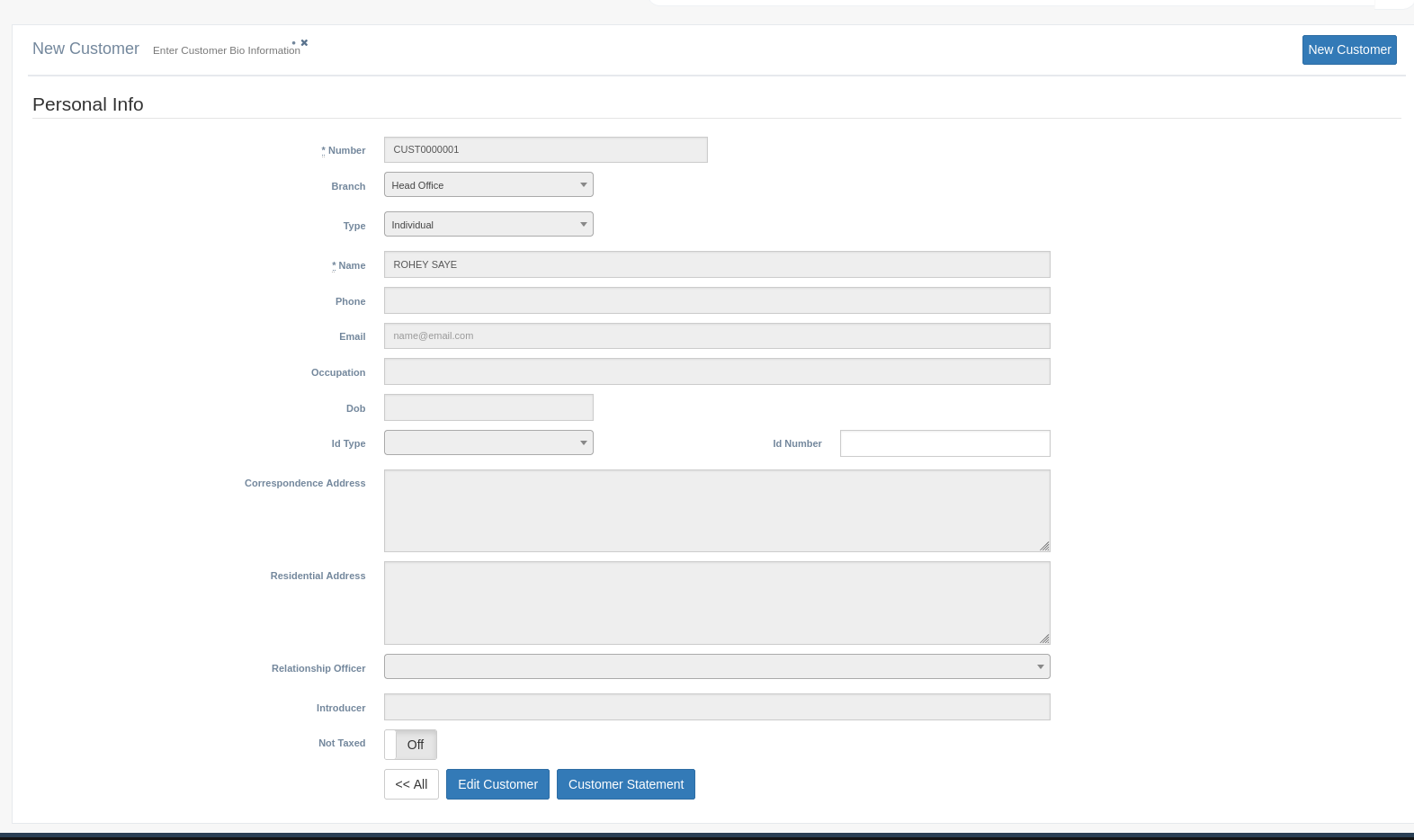
Understanding the Customer Preview Layout
The customer preview page displays a comprehensive view of the customer's information organized into logical sections. Below is a detailed explanation of each component and its purpose in the system.
Header Section
This section provides quick identification and core actions for the customer:
Customer Number: The unique identifier assigned to the customer, displayed prominently at the top of the page (e.g., CUST0000001).
Customer Name: The full name of the customer as entered during customer creation. This helps quickly verify you're viewing the correct customer record.
Edit Customer: Button that opens the customer information in edit mode, allowing modifications to customer details when necessary.
Customer Statement: Button that generates a comprehensive statement of the customer's policies, premiums, claims, and payment history.
<< All: Navigation button that returns the user to the "All Customers" list, allowing quick navigation between customer records.
Personal Information Section
This section displays the essential identifying information about the customer:
Number: The unique system-generated identifier for the customer.
Branch: The specific company branch that manages this customer relationship.
Type: The customer classification (Individual, Corporate, Government, etc.).
Name: The customer's full name as registered in the system.
Phone: The primary contact number for reaching the customer.
Email: The customer's email address used for electronic communications.
Occupation: The customer's profession or business activity.
DOB: Date of Birth for individual customers, displayed in the system's standard date format.
ID Type: The type of identification document provided by the customer.
ID Number: The unique identifier from the customer's identification document.
Address Information
This section shows the customer's location details:
Correspondence Address: The primary address where all mail communications are sent.
Residential Address: The customer's actual living address or business location.
Relationship Management
Fields related to managing the customer relationship:
Relationship Officer: The staff member responsible for managing the customer relationship.
Introducer: Person or entity that referred the customer to the insurance company.
Not Taxed: Indicator showing whether the customer is exempt from certain taxes (On/Off).
Action Buttons
Edit Customer: Opens the customer record in edit mode, allowing changes to any customer information fields.
Customer Statement: Generates a comprehensive report of the customer's relationship with the company, including policies, premiums, claims, and payment history.
<< All: Returns the user to the complete list of customers in the system.
Customer Preview Functions
Viewing Customer Details
The preview interface provides a read-only view of all customer information. This allows staff to:
- Quickly verify customer details when speaking with them
- Check policy eligibility based on customer information
- Confirm contact details before sending communications
- Review relationship history and assigned officers
Editing Customer Information
When customer details need to be updated:
- Click the "Edit Customer" button
- The system converts the display to editable fields
- Make necessary changes to any information
- Save changes to update the customer record
Generating Customer Statements
To produce a comprehensive overview of the customer's relationship:
- Click the "Customer Statement" button
- The system compiles the customer's complete history with the company
- The statement includes:
- Detailed Transactions
- Account Statements
- Communication history
- The statement can be viewed on screen, printed, or exported to PDF
Best Practices for Using Customer Preview
To effectively use the customer preview interface:
- Verify you are viewing the correct customer record before taking any actions
- Use the preview page to confirm customer details during customer interactions
- Generate customer statements before annual reviews or significant policy changes
- Check for any special notes or status indicators before proceeding with new policies
- Use the edit function to update contact information whenever changes are reported
- Document any customer interactions or special circumstances in the appropriate system notes
- Always return to the All Customers view when finished to protect customer privacy