
Motor Policies
New Motor Policy Creation
A policy is the product an insurance company offers to protect its customers against financial loss due to accidents, theft, or other covered events. This section provides complete instructions for underwriting new motor insurance policies, with detailed explanations of all form fields, calculation methods, and policy management features.
Navigating to the Motor Policy Creation form
- Login to the Integrated Insurance Management System, Navigate to the Policies Section of the sidebar and from the list of risk classes:
- Motor Policies
- Fire Policies
- Accident Policies
- Engineering Policies
- Bond Policies
- Marine Policies
- Oil & Gas Policies
- To underwrite a Motor Policy, click on the "New Motor Policy" button from the "Policies" section to access the form grouped into sections of customer, intermediary agency, vehicle, sticker, policy details, and premium calculations.
New Motor Policy Form Overview
The New Motor Policy form is a comprehensive interface for creating vehicle insurance policies split into multiple frames for customer, vehicle, policy details, and premium calculations.
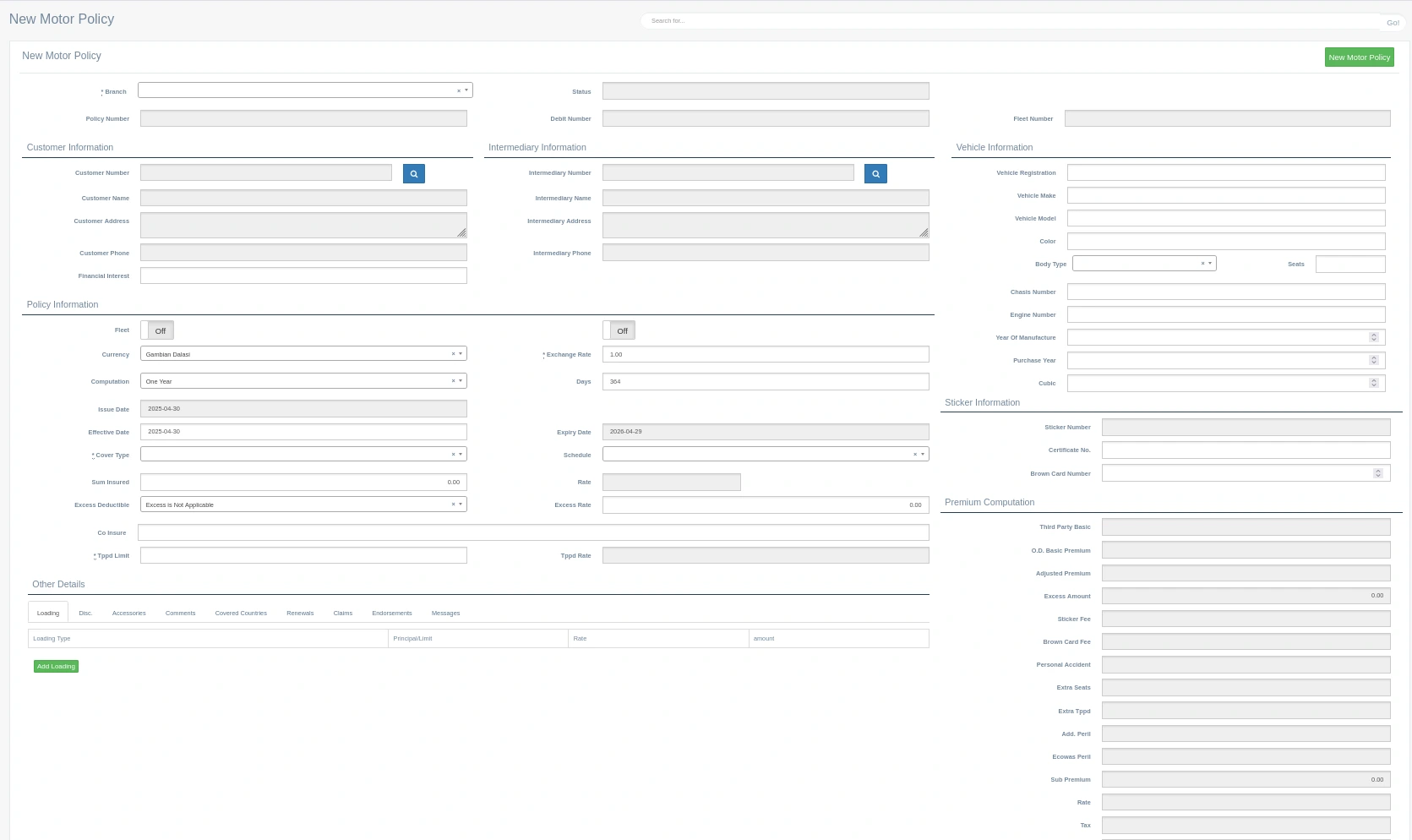
Accessing the New Motor Policy Form
- Log into the Insurance Management System
- Navigate to "Motor" section
- Click the "New Motor Policy" button
- The system displays the policy creation form
Form Organization
The New Motor Policy form is organized into 8 main sections:
- Basic Policy Information: Core policy identifiers and status
- Customer Information: Policyholder details
- Intermediary Information: Broker or agent details (if applicable)
- Vehicle Information: Comprehensive vehicle specifications
- Policy Information: Coverage details, dates, and calculations
- Sticker Information: Regulatory documentation details
- Premium Computation: Detailed breakdown of premium calculations
- Other fields: Policy discount, comments, accessories, endorsements and messages
Basic Policy Information
This section contains fundamental policy identifiers and status information that establish the core parameters of the policy.

Branch
The branch field (marked with *) is a required dropdown selection that identifies which office location is issuing the policy. This affects reporting, commission calculations, and user access permissions. The dropdown includes all authorized branches the current user has access to, with an 'x' button to clear the selection if needed.
Status
This field displays the current policy status, which is system-generated and automatically filled. For new policies, this typically shows as "New" or "Draft" until the policy is finalized. The status field updates throughout the policy lifecycle to reflect its current state (e.g., "Active", "Pending Payment", "Expired").
Policy Number
A unique identifier for the policy that is automatically generated by the system following a predetermined format. The number serves as the primary reference for all policy-related transactions.
Debit Number
This field contains the associated financial record identifier that links the policy to accounting entries. It is typically auto-generated when the policy is saved but may be editable by users with appropriate permissions. The debit number facilitates financial tracking and reconciliation.
Fleet Number
A system-generated field used when the policy is part of a multi-vehicle fleet insurance arrangement. When populated, this enables special fleet-related features and reports, and may affect premium calculations through fleet discounts.
Customer Information
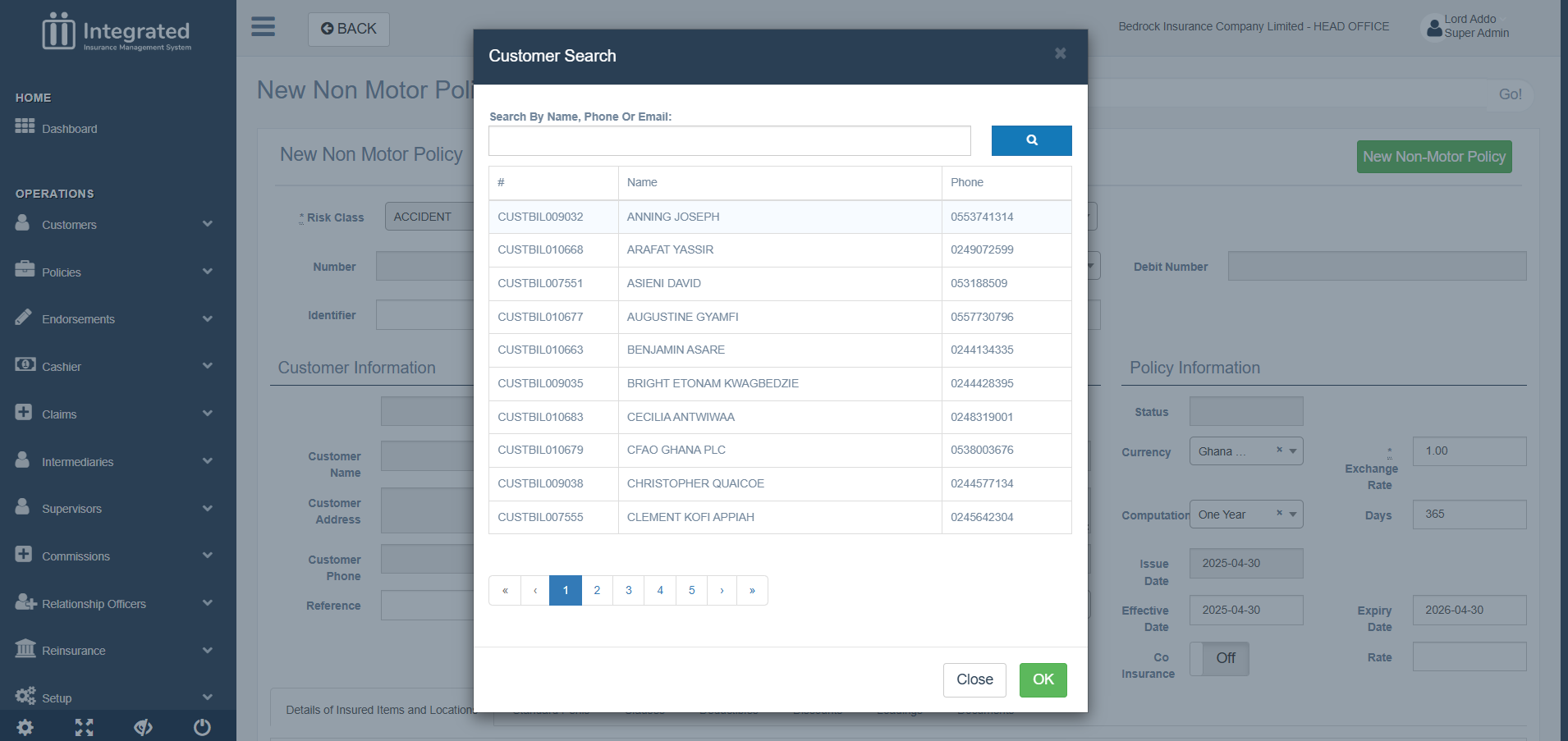
This section captures comprehensive details about the policyholder and establishes the legal relationship between the insurer and the insured party. A customer can be selected from existing customer records by clicking the the search button Magnifiying Glass Icon to open the dialog that allows for searching or finding existing customers/ policy holders
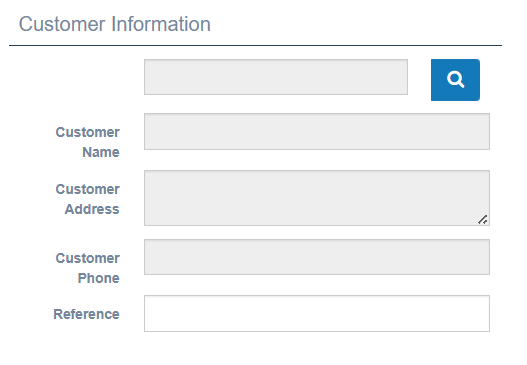
Customer Number
A unique identifier that connects the policy to an existing customer record in the system. This text field is autopopulated via a quick lookup of existing customers from the database.
Customer Name
The full legal name of the policyholder, whether an individual or organization. Though auto-populated, this is a required text input field that establishes the primary insured party. For individual customers, this typically follows the format of first name followed by last name. For corporate customers, the full registered business name is used.
Customer Address
The complete mailing address of the policyholder, captured in a multi-line text field. This autopopulated information is used for policy document delivery, claims correspondence, and regulatory reporting. The address includes all necessary components for postal delivery, including building number, street name, city, region/state, and postal code.
Customer Phone
The primary contact telephone number for the policyholder. This information is used to facilitate communication regarding claims, renewals, and policy updates. The phone number should follow the standard format for the region, including country code when applicable.
Financial Interest
This field captures information about any third party with a financial stake in the insured vehicle, such as a bank or leasing company that has provided financing. When a vehicle is financed, this field should contain the lender's name and any relevant loan or lease reference numbers. This ensures the interest is properly noted on the policy documents.
Search Functionality
The customer search functionality allows quick access to existing customer records. When the search button is clicked, a lookup dialog appears where users can search by name, phone, or other identifiers. Once a customer is selected, all fields are populated automatically. Users can still edit customer information directly in the form if needed, which can also update the customer record in the database depending on user permissions.
Intermediary Information
This section captures details about any broker, agent, or intermediary involved in facilitating the policy arrangement between the insurance company and the customer.
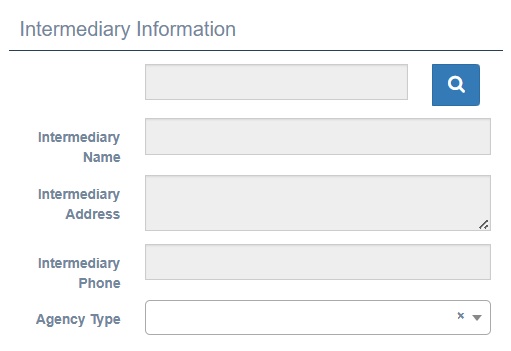
Intermediary Number
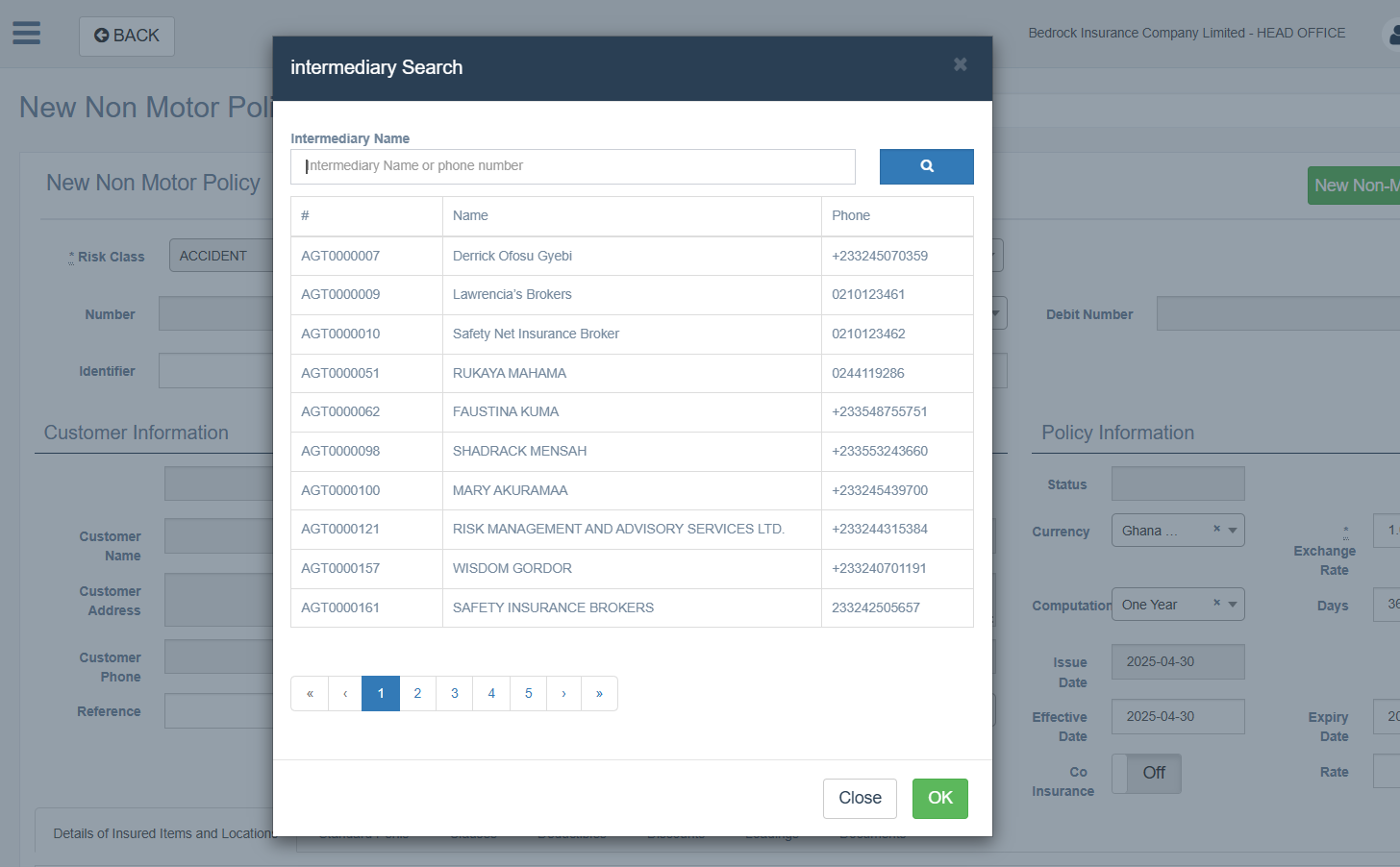
This field contains the unique identification code assigned to the broker or agent who arranged the policy. Like the customer number field, it includes a search button (magnifying glass icon) that provides access to the intermediary database. This mandatory field is only populated via a lookup. The intermediary number serves as the link to commission calculations and broker performance tracking.
Intermediary Name
The full registered name of the brokerage firm or individual agent who facilitated the policy arrangement. This field automatically populates when a valid intermediary number is entered but can also be manually entered when necessary. The intermediary name appears on policy documents and commission statements, providing clear attribution of the business relationship.
Intermediary Address
The complete business address of the intermediary, displayed in a multi-line text field. This information is auto-filled when an intermediary is selected via the search function and is not editable to accommodate any recent changes. The address is used for commission statements, and regulatory reporting related to intermediary activities.
Intermediary Phone
The primary contact telephone number for the intermediary. This field auto-populates when an intermediary record is selected but can be updated if needed. This contact information facilitates direct communication regarding policy details, customer inquiries, or commission matters.
Intermediary Search
The intermediary search function operates similarly to the customer search, providing a convenient way to retrieve authorized intermediary details from the system database. Clicking the magnifying glass icon opens a search dialog where users can look up intermediaries by name, code, or region. The system maintains a register of approved intermediaries, ensuring that only authorized entities can be associated with policies. If the policy is arranged directly with no intermediary involvement, all these fields should remain blank.
Vehicle Information
This section captures detailed specifications about the insured vehicle, providing the technical basis for risk assessment and premium calculation.
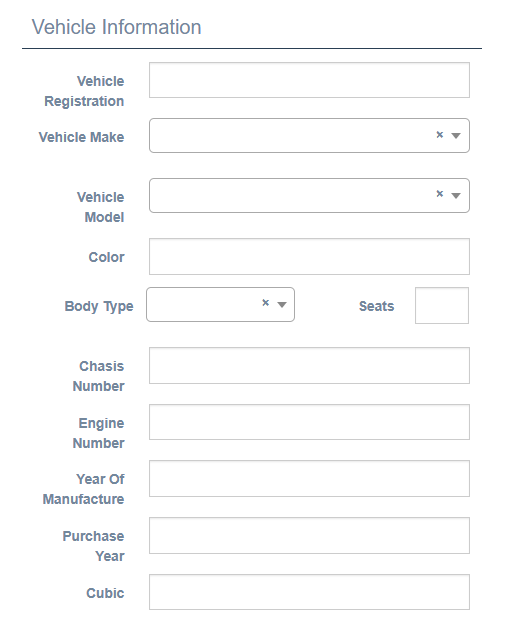
Vehicle Registration
The official license plate number or registration identifier assigned by the transportation authority. This required text field serves as the primary public identifier for the vehicle and must match exactly what appears on the vehicle's registration document. The system may enforce specific formatting rules based on local registration standards. This information is critical for verification purposes and appears on all policy documentation.
Vehicle Make
The name of the vehicle manufacturer (e.g., Toyota, Mercedes-Benz, Ford). This required text field establishes the brand identity of the vehicle and influences risk assessment and parts valuation. The make should be entered exactly as it appears on the official vehicle documentation, avoiding abbreviations or variations.
Vehicle Model
The specific model designation assigned by the manufacturer (e.g., Corolla, C-Class, F-150). This required text field further refines the vehicle identity and provides important information for risk assessment, as different models within the same make can have significantly different risk profiles. The model information affects premium calculations and claims handling guidelines.
Color
The predominant exterior color of the vehicle. This required text field provides an additional identification characteristic and helps with vehicle verification during inspections or claims. The color should be described using standard terminology (e.g., Red, Silver, White) rather than manufacturer-specific color codes.
Body Type
A dropdown selection that classifies the vehicle according to its structural design (e.g., Sedan, SUV, Pickup). This required field significantly impacts risk assessment and premium calculation, as different body types are associated with varying risk profiles. The body type also influences coverage options and may trigger specific endorsements or exclusions.
Seats
The total passenger capacity of the vehicle, including the driver's seat. This numeric input field is required because it directly affects third-party liability coverage calculation, particularly for personal injury protection. This field is pre-populated by selected the body type. Every type of vehicle has a number of seats. For commercial vehicles, the number of seats can only be increased and never go below the standard. Any additional seats afftect the premium calculation. Regulatory requirements often mandate minimum coverage amounts based on seating capacity, especially for commercial vehicles.
Chassis Number
The Vehicle Identification Number (VIN) or chassis identifier that uniquely identifies the specific vehicle. This required text field contains the manufacturer's unique code that distinguishes this vehicle from all others. The chassis number is critical for claims verification, theft recovery, and establishing the exact specification of the insured vehicle.
Engine Number
The unique serial number assigned to the vehicle's engine. This required text field provides an additional layer of identification that helps prevent fraud and enables precise identification even if other components are altered. The engine number is particularly important for total loss assessments and theft investigations.
Year Of Manufacture
The year in which the vehicle was produced, selected from a dropdown with a selector tool for easy navigation. This required field directly impacts the vehicle's value assessment and depreciation calculations. Older vehicles typically command lower premiums for comprehensive coverage but may have higher rates for liability due to safety feature differences.
Purchase Year
The year in which the current owner acquired the vehicle, selected from a dropdown with a selector tool. This required field helps establish ownership history and may affect premium calculations when significantly different from the manufacture year. The purchase year is also relevant for value assessment in total loss situations.
Cubic
The engine displacement measured in cubic centimeters (cc) or liters, entered in a numeric field with a selector tool for common values. This required field impacts both vehicle performance assessment and taxation categories in many jurisdictions. Larger engine displacement typically correlates with higher power output, which may influence risk assessment and premium calculations.
Vehicle Type Selection Impact
The information provided in this section collectively determines the vehicle's risk profile and premium structure. Specifically, the Body Type selection may trigger different premium calculation methods based on usage patterns and accident statistics associated with each type. The Seat count directly influences third-party liability coverage requirements, particularly for personal injury protection. The Manufacturing Year affects depreciation calculations for comprehensive coverage and may trigger additional requirements for older vehicles in some jurisdictions.
Sticker Information
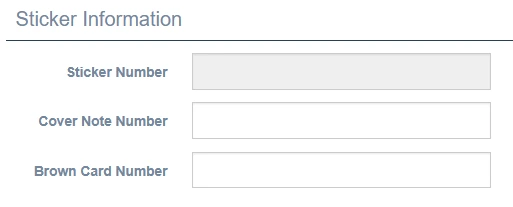
This section captures regulatory documentation details for the policy.
Fields
Sticker Number Auto-generated text input generated by the system.
Certificate NUmber Associated certificate for the Sticker
Brown Card Number
Policy Information
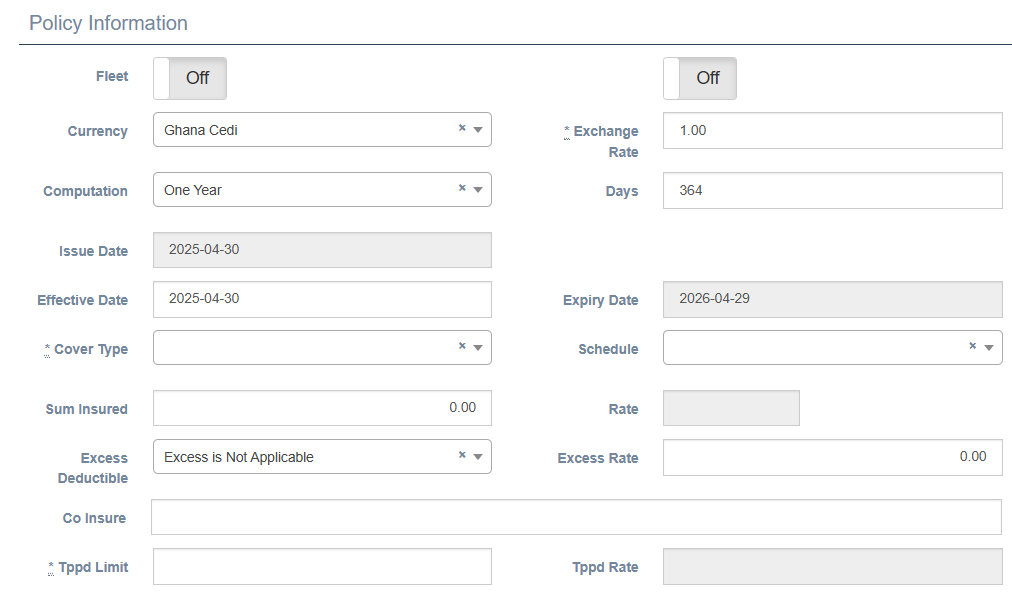
This section defines the coverage specifics, policy duration, and financial terms that form the contractual basis of the insurance agreement.
Fleet
A toggle button that indicates whether this policy is part of a fleet arrangement covering multiple vehicles under a single policy structure. When set to "On," the system enables special fleet-related features and calculations, including potential fleet discounts and uploads in a specified format. This setting is typically auto-determined based on the existence of a Fleet Number in the basic information section but can be manually adjusted when necessary.
Currency
A dropdown field specifying the currency in which the policy is denominated. The default selected option is always the currency set up as the base . This required field affects all monetary calculations and reporting. The system typically defaults to the local currency of operation but provides options for policies that need to be issued in foreign currencies, such as for international clients or special arrangements.
Exchange Rate
A numeric input field that specifies the conversion rate between the selected currency and the system's base currency. This field is marked as required (*) and defaults to 1.00 for local currency policies. For foreign currency policies, this value can be set to the rate at the time of policy issuance or renewal, which is used to calculate the equivalent values in the system's base currency for accounting and reporting purposes.
Computation
A dropdown selection that determines how the policy term is calculated. The example shows "One Year" as the selected option. This required field affects date calculations and premium prorating. Other common options might include "Pro Rata," "Short Term,"
Days
A numeric input showing the total number of days of coverage provided by the policy. The example shows 364 days, which is typical for a one-year policy mostly attached ot the selected value for "Computation" (allowing for renewal processing). This field is auto-calculated based on the effective and expiry dates but may be adjusted manually in special circumstances, which would then recalculate the expiry date.
Issue Date
The date when the policy is created in the system, presented in a date picker field using YYYY-MM-DD format. This field is typically auto-filled with the current date but and cannot be adjusted. The issue date is used for administrative tracking and may differ from the effective date in cases of advance booking or backdating.
Effective Date
The date when insurance coverage begins, entered in a date picker field using YYYY-MM-DD format. This required field establishes the official start of the coverage period. The system allows this date to be set in the past (backdating) or future (advance booking) within authorized limits, typically controlled by user permissions.
Expiry Date
The date when insurance coverage ends, presented as a read-onlydate picker field using YYYY-MM-DD format. This field is auto-calculated based on the effective date and the selected computation period and number of days selected (showing 2026-04-28 in the example, which is 364 days, One year for computation period, after the effective date). The expiry date marks the point at which the policy must be renewed to maintain continuous coverage.
Cover Type
A dropdown selection (marked with *) that defines the level of insurance protection provided. This critical field determines which coverages are included in the policy and directly affects premium calculations. Common options include "Third Party Only," "Third Party Fire & Theft," and "Comprehensive," each with distinct coverage scopes and pricing structures.
Schedule
A dropdown selection that specifies the policy schedule type, which defines the structure and presentation of the policy documentation. This required field affects how the policy terms are formatted and which clauses are included in the final documentation. The schedule type may vary based on vehicle category, customer type, or specific regulatory requirements.
Sum Insured
A numeric input field showing the total insured value of the vehicle, expressed in the selected currency. This required field is the primary basis for premium calculation for comprehensive coverage. It represents the maximum potential payout in the event of a total loss and should accurately reflect the vehicle's current market value. A value can only be entered if the selected cover type is "Comprehensive" the entered value affects the computation. No other cover types takes a value for sum insured
Rate
A numeric input field for the base premium rate applied to the sum insured to calculate the basic premium. This required field is typically determined by underwriting guidelines based on vehicle type, usage, and cover type. The rate is expressed as a percentage of the sum insured for comprehensive coverage or as a fixed rate for third-party coverage.
Excess Deductible
A dropdown selection that defines the customer's financial responsibility in the event of a claim. The example shows "Excess Is Not Applicable" as the selected option. This required field determines whether the policyholder must pay an initial portion of any claim before insurance coverage applies. The excess structure affects premium calculations, with higher excess levels typically resulting in lower premiums.
Excess Rate
A numeric input field showing the rate used to calculate the excess amount when applicable. This field is displayed as 0.00 when excess is not applicable. When an excess applies, this rate is used to calculate the specific excess amount based on the Cover Type, depending on the excess structure.
Co Insure
A text input field for recording details of any co-insurance arrangement where risk is shared with other insurers. This optional field is used when the policy risk is distributed among multiple insurance companies, specifying the participating insurers and their respective shares of the risk.
Tppd Limit
The Third Party Property Damage limit is a numeric input field that specifies the maximum amount the insurer shall pay for third-party property damage claims. This required field establishes a crucial coverage limit, which is detailed in the policy documentation. The limit is typically dictated by regulatory stipulations and underwriting guidelines, based on vehicle type and usage. Any increase will result in an additional increase in premium calculation.
Tppd Rate
The Third Party Property Damage rate is a numeric input field showing the rate used to calculate the third-party property damage premium component. This field is typically system-calculated based on the TPPD limit and risk factors associated with the vehicle and coverage type. The rate is applied to the TPPD limit to determine this portion of the premium. An increase in the rate results in an increase in the premium.
Date Handling
The policy dates follow specific business rules for consistency and compliance. The Issue Date defaults to the current system date when a new policy is created. The Effective Date may be backdated within authorized limits, typically controlled by user permissions and regulatory constraints. The Expiry Date is automatically calculated based on the Effective Date and the selected Computation period, with the example showing a one-year policy running for 364 days to allow processing time for renewal.
Premium Computation
This section provides a detailed breakdown of the premium calculation with itemized components, offering transparency into how the final premium is derived.
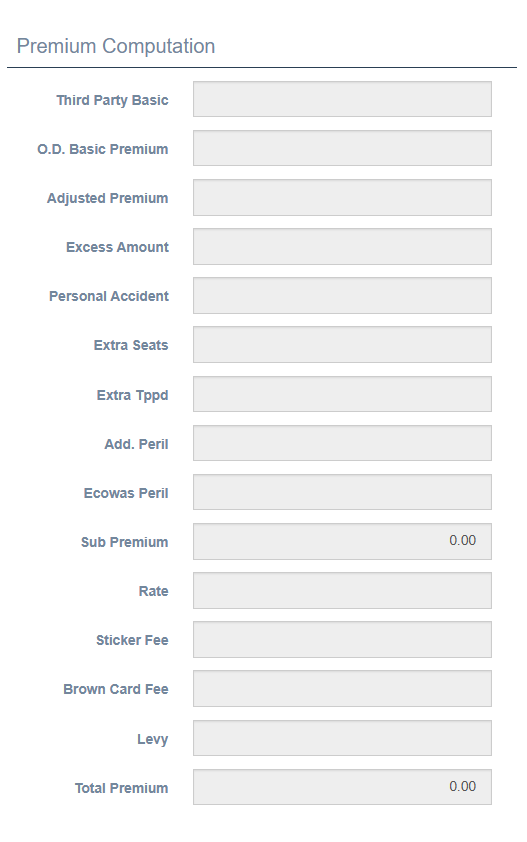
Third Party Basic
The foundational premium component covering the mandatory third-party liability required by law. This amount is calculated based on the vehicle type, body class, and seating capacity. This is a non-negotiable component present in all motor policies regardless of coverage level, as it fulfills the legal requirement for minimum insurance coverage. The calculation typically follows regulatory guidelines that specify minimum rates based on vehicle categories.
O.D. Basic Premium
The Own Damage Basic Premium covers damage to the insured vehicle itself. This component only applies to comprehensive policies and is calculated by multiplying the Sum Insured by the applicable Rate. For example, a vehicle valued at 100,000 with a rate of 3.5% would have an O.D. Basic Premium of 3,500. This component is absent in third-party only policies.
Adjusted Premium
The modified base premium after initial adjustments for factors such as no-claims discounts, loyalty bonuses, or risk surcharges have been applied. This value represents the base premium after underwriting considerations but before additional coverages or fees are added. It serves as an intermediate calculation step in the premium computation process.
Excess Amount
The calculated value of the policyholder's financial responsibility in the event of a claim. The example shows 0.00, indicating that excess is not applicable for this policy. When an excess applies, this field displays the calculated amount, which may be a fixed sum or a percentage of the sum insured, depending on the excess structure defined in the policy settings.
Sticker Fee
The cost of the regulatory insurance sticker that must be displayed on the vehicle as proof of insurance. This is a fixed amount per policy determined by regulatory authorities and does not vary with vehicle value or coverage type. The sticker serves as visible evidence of compliance with mandatory insurance requirements.
Brown Card Fee
The fee for cross-border insurance coverage applicable when the vehicle will be operated in countries participating in the Brown Card system. This fee is only charged when the policyholder requests this additional coverage. The Brown Card provides proof of insurance that is recognized across participating countries, eliminating the need for separate policies when traveling across borders.
Personal Accident
Premium for optional coverage that provides compensation for the driver and/or passengers in the event of injury or death resulting from an accident. This add-on coverage extends protection beyond the standard third-party liability coverage to include the vehicle's occupants. The premium is typically based on the number of seats and the benefit limits selected.
Extra Seats
Additional premium charged for covering passengers beyond the standard seating capacity included in the base premium. This is particularly relevant for commercial vehicles or those designed to carry multiple passengers. The premium is calculated on a per-seat basis and directly increases the personal injury protection portion of the coverage.
Extra Tppd
Premium for enhanced Third Party Property Damage coverage beyond the standard limit. This option allows policyholders to increase their protection against claims for damage to third-party property. The additional premium is calculated based on the increased limit amount and applies primarily to higher-value vehicles or commercial operations where the risk of causing significant property damage is elevated.
Add. Peril
Premium for Additional Perils coverage, which extends protection to include specific risks not covered in the standard policy. Common additional perils include natural disasters, riots, or strikes. This optional coverage allows policyholders to customize their protection based on specific concerns or regional risk factors.
Ecowas Peril
Premium for regional coverage extension specifically for countries within the Economic Community of West African States (ECOWAS). This specialized coverage addresses unique risks associated with operating vehicles across these specific territories and complies with ECOWAS insurance requirements. This is separate from the Brown Card system and applies to specific regional considerations.
Sub Premium
The subtotal of all premium components before the application of taxes and levies. This intermediate calculation represents the pure insurance cost for all selected coverages and serves as the basis for calculating regulatory charges. The sub-premium allows underwriters to analyze the technical premium before government-mandated additions.
Rate
A reference value used in various premium calculations throughout the form. This field may display a key rate used in the final calculations or serve as a reference point for underwriters reviewing the policy. The specific meaning may vary depending on system configuration and local practice.
Tax
The applicable insurance tax charged on the policy, calculated as a percentage of the sub-premium according to current tax regulations. This amount is collected by the insurance company but remitted to the government tax authorities. The tax rate is typically determined by legislation and may vary based on policy type or coverage class.
Levy
Regulatory or statutory charges imposed on insurance policies to fund industry supervisory bodies, compensation funds, or other mandated purposes. Like tax, the levy is typically calculated as a percentage of the sub-premium according to current regulations. These funds support industry-wide initiatives such as insurance guarantee schemes or regulatory oversight.
Total Premium
The final amount payable by the policyholder, representing the sum of all premium components, taxes, and levies. This is the bottom-line figure that appears on invoices and receipts. The total premium represents the complete cost of insurance coverage for the specified term and serves as the basis for payment collection and financial reconciliation.
Automatic Calculations
The premium computation section largely operates through automatic calculations driven by the data entered in other sections of the form. Most fields showing monetary values (particularly those displaying 0.00 in the example) are system-calculated results rather than user input fields. These calculations apply complex rating algorithms and underwriting rules to ensure consistent pricing. The final premium amount is system-calculated based on all relevant factors, providing both accuracy and efficiency in the quoting process.
Other Details Tab Panel
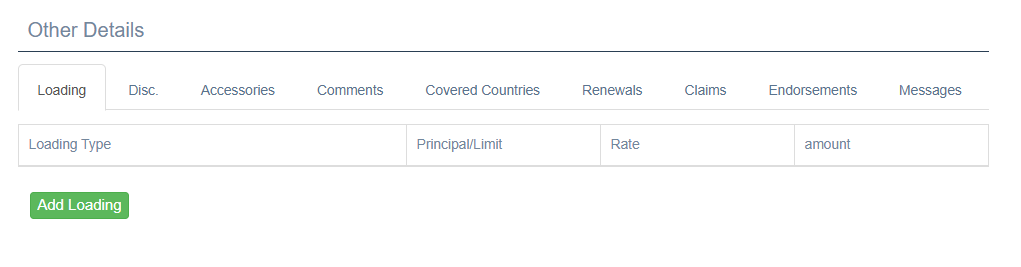
The "Other Details" section provides tabbed access to additional policy information that complements the main policy data while keeping the interface organized and accessible.
Loading Tab
The Loading tab manages premium adjustments that increase the base premium due to specific risk factors like a vehicle being 10 years or older. This tab is active by default when opening the Other Details section, as shown in the image. Loading adjustments are crucial for risk-appropriate pricing that accounts for factors not captured in the standard rating structure and can be added by first selecting the appropriate Loading Type as "YES" or "NO", Principal or Limit., Rate and Amount
The tab displays a tabular view with four key columns:
Loading Type identifies the category of loading being applied. Common loading types include Age (for young or elderly drivers), Occupation (for high-risk professions), Vehicle Modification (for non-standard alterations), or Claims History (for previous loss experience). Each loading type corresponds to a specific risk factor that warrants a premium adjustment.
Principal/Limit defines the amount or percentage basis to which the loading applies. This may be a monetary value or a reference to a coverage limit affected by the loading. The principal establishes the foundation for the loading calculation and ensures that premium increases are proportional to the associated risk.
Rate specifies the loading calculation rate applied to the principal amount. This is typically expressed as a percentage and represents the severity of the risk factor. Higher rates indicate greater perceived risk or more significant coverage enhancement.
Amount shows the calculated monetary value of the loading, which is added to the base premium. This field typically displays the result of multiplying the Principal/Limit by the Rate and represents the actual premium increase for this specific factor.
The Add Loading button (shown as a green button at the bottom of the tab) creates new loading entries for specific risk factors. When clicked, it opens a loading definition dialog where underwriters can select the loading type, specify the principal and rate, and add any necessary notes. Each policy can have multiple loading factors to address all relevant risk characteristics.
Disc. Tab
The Discounts tab manages premium reductions granted for favorable risk characteristics or marketing incentives. Similar to the Loading tab structure, this tab allows underwriters to apply and track various discount types such as No Claims Discount, Security Device Discount, or Loyalty Discount. Each discount entry reduces the premium by a calculated amount based on specified criteria.
Accessories Tab
The Accessories tab documents additional items attached to the vehicle that require specific coverage. This tab allows recording of non-standard equipment such as expensive sound systems, custom wheels, or aftermarket modifications. Each accessory can be listed with its value, which may increase both the sum insured and the premium. This detailed documentation ensures proper coverage for all vehicle components.
Comments Tab
The Comments tab provides a free-text area for underwriters and administrators to add notes, observations, and special instructions related to the policy. These comments might include underwriting considerations, inspection requirements, or customer service notes. The comment history is preserved for future reference and creates an audit trail of policy decisions and communications.
Covered Countries Tab
The Covered Countries tab specifies the geographic regions where the insurance coverage is valid. By default, coverage typically applies only within the country of issue, but this tab allows extension to specific additional countries as needed. Each country entry may affect the premium and trigger specific endorsements or documentation requirements like International Motor Insurance Cards.
Renewals Tab
The Renewals tab tracks the policy's renewal history and future scheduling. For existing policies being renewed, this tab shows previous terms, premium history, and coverage changes over time. For new policies, this tab remains relatively empty until the first renewal cycle approaches. The renewal information helps maintain continuity of coverage and supports customer retention efforts.
Claims Tab
The Claims tab displays the claim history associated with this specific vehicle and policyholder. For vehicles with previous insurance, this tab may show imported claims data that impacts current underwriting decisions. Each claim entry typically includes date, type, amount, and status information. This claim history directly influences premium calculations and coverage eligibility.
Endorsements Tab
The Endorsements tab manages policy amendments that occur after the initial policy issuance. Endorsements might include changes to vehicle details, coverage limits, or policyholder information. Each endorsement is recorded with its effective date, description, and premium impact. This tab ensures that all policy modifications are properly documented and priced.
Messages Tab
The Messages tab maintains a communication log relate
Saving the Policy
The "Save" button at the bottom of the form completes the policy creation process.
Save Process
- System validates all required fields
- Policy number is confirmed or generated
- Policy is saved to the database
- User is redirected to policy details view
Validation Requirements
- All required fields must be completed
- Business validation rules check for logical consistency
- Date ranges must be valid
- Premium calculations must be completed
Best Practices for Creating Motor Policies
Customer Verification: Always verify customer identity and contact information
Vehicle Inspection: When possible, verify vehicle details against registration document
Coverage Explanation: Ensure customer understands coverage limits and exclusions
Documentation: Attach copies of relevant documents to the policy record
System Behavior Notes
Auto-calculation:
- Many fields auto-calculate based on other inputs
- Days field auto-populates based on effective and expiry dates
- Premium components calculate automatically when rate and sum insured are entered
Required Fields:
- Fields marked with asterisk (*) are mandatory
- System prevents saving until all required fields are completed
Default Values:
- Current date is default for Issue Date and Effective Date
- Default currency is set to system preference ("Gambian Dalasi" shown)
- Exchange Rate defaults to 1.00
- Some dropdowns have pre-selected values
Search Integration:
- Customer search integrates with customer database
- Vehicle search can validate registration against transport authority records (if connected)
- Intermediary search pulls from approved broker/agent list
Special Field Behaviors
Sum Insured
- Represents the maximum potential payout for comprehensive policies
- May be vehicle value or fixed amount depending on coverage type
- Directly affects premium calculation
Cover Type Selection
- Determines available options throughout the form
- Changes which premium components are active
- May trigger required fields based on regulatory requirements
Currency Handling
- Local currency is default ("Gambian Dalasi" shown)
- Exchange rate applies for foreign currency policies
- All calculations convert to local currency for accounting purposes