
Customers
Customer Management
This section provides comprehensive guidance on managing customer information within the Integrated Insurance Management System. Learn about creating new customers, understanding the various fields in the customer form, and how to process customer records.
Customer Creation Form
The customer creation form serves as the foundation for establishing new client relationships in the insurance system. This interface ensures that all necessary customer information is properly captured for policy issuance, claims processing, and relationship management.
Navigating to the Form
- Log into the Insurance Management System
- Select "Customers" from the Operations menu in the sidebar
- Click on "New Customer" to access the customer creation form
- The system will display the customer information form with multiple fields
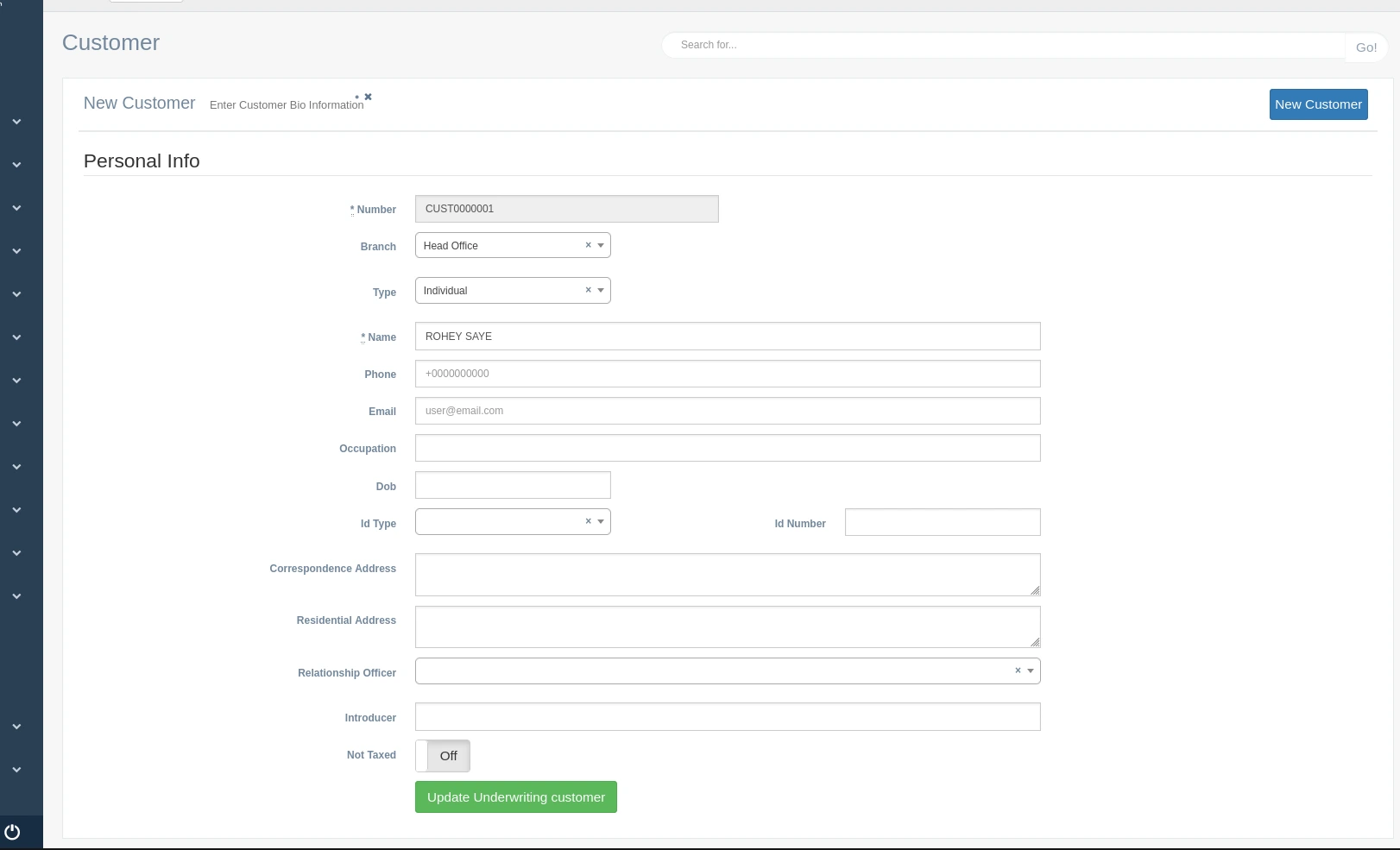
Understanding Form Fields
The customer creation form is divided into sections to organize the information logically. Below is a detailed explanation of each field and its purpose in the system.
Personal Info Section
This section captures the essential identifying information about the customer:
Number: A unique system-generated identifier for the customer. This field is automatically populated and marked with an asterisk (*) indicating it is required.
Branch: The specific company branch that will manage this customer relationship. Select from the dropdown list of available branches. This determines which office will be primarily responsible for the customer.
Type: Categorizes the customer (Individual, Corporate, Government, etc.). This classification impacts available policy types and risk assessment procedures.
Name: The customer's full name. For individuals, enter first and last name as indicated. For corporate customers, enter the full registered business name. This field is required as indicated by the asterisk (*).
Phone: The primary contact number for the customer. International format is supported with the country code. This field is used for communication regarding policies, claims, and renewals.
Email: The customer's email address used for electronic communications, policy documents, and account notifications.
Occupation: The customer's profession or business activity. This information is used in risk assessment and may affect premium calculations for certain policy types.
Dob: Date of Birth for individual customers. This field helps calculate age-dependent premiums and verify customer identity.
ID Type: The type of identification document provided by the customer (Passport, National ID, Driver's License, etc.). Select from the dropdown options.
ID Number: The unique identifier on the customer's identification document. This helps verify customer identity and prevent fraud.
Address Information
This section captures the customer's location details:
Correspondence Address: The primary address where all mail communications should be sent. This may include policy documents, premium notices, and claim information.
Residential Address: The customer's actual living address or business location. This information is particularly important for property insurance policies and risk assessment.
Relationship Management
Fields that help manage the customer relationship:
Relationship Officer: The staff member responsible for managing the customer relationship. Select from the dropdown list of available officers.
Introducer: Person or entity that referred the customer to the insurance company. This field helps track referral sources and may be used for commission calculations.
Not Taxed: Toggle switch that indicates whether the customer is exempt from certain taxes. When set to "Off", normal tax rules apply.
Action Button
- Create Underwriting Customer: This button submits the form and creates the new customer record. It initiates the underwriting process for risk assessment before policy issuance.
Form Submission Outcomes
Successful Submission
When a customer is successfully created:
- The system displays a green success toast notification in the top-right corner confirming "Customer created successfully"
- The system automatically assigns a unique customer ID
- The new customer record becomes available in the "All Customers" list
- The customer can now be selected for policy creation and other insurance processes
- The system logs the creation event for audit purposes
- The user is redirected to the customer details view or the customers list (depending on system configuration)
Failed Submission
If the form submission fails:
- The system displays a red error toast notification explaining the reason for failure
- Required fields that were left empty are highlighted with a red border
- Error messages appear under the problematic fields with specific guidance
- The form remains populated with the entered data so the user can correct errors without re-entering all information
- Common failure reasons include:
- Missing required fields (indicated by asterisks)
- Invalid email format
- Duplicate customer records (same ID number or exact name match)
- System connectivity issues
Best Practices for Customer Creation
To ensure accurate customer records and smooth policy processing:
- Verify customer identity documents before creating records
- Use standardized formats for phone numbers and addresses
- Confirm email addresses are accurate for delivery of electronic documents
- Assign appropriate relationship officers based on customer needs
- Check for existing records to avoid duplicates
- Enter complete information to facilitate future underwriting processes
- Document any special circumstances or notes in appropriate system fields